
Why You Need a Laptop Stand
Remote work and working from cafes have become the norm, and it's now common to stare at a laptop screen for hours a day. But when you place a laptop directly on a desk, the top of the screen ends up well below eye level. This leads to an unconscious, hunched-forward posture that gradually strains the muscles in your neck and shoulders.
A laptop stand solves this "screen too low" problem. By raising the laptop roughly 10–15cm, it brings the top of the screen closer to eye level, making it easier to maintain a naturally upright posture. It also creates space between the base of the laptop and the desk, improving fan intake and exhaust airflow — which can help prevent thermal throttling caused by rising CPU/GPU temperatures.
That said, laptop stands can be tricky to shop for: "they all look the same," yet the adjustment mechanism, compatible sizes, and portability actually vary a lot between products. This article breaks down the key criteria for choosing one, then compares seven candidate products by use case with their specific specs.
How to Choose a Laptop Stand: 4 Criteria for Getting It Right
1. Height and Angle Adjustment Method
Adjustment mechanisms generally fall into two categories: "continuous" (free-stop) and "multi-stage" (fixed preset angles). Continuous models let you fine-tune the height in 1cm increments to match your seated height and monitor distance, making them a strong choice if comfort during long work sessions is your priority. Multi-stage models, on the other hand, require less effort to adjust and are simple and easy to use if you tend to stick with the same angle every time. Before buying, always check the "adjustment range (minimum to maximum height)" and whether it's continuous or multi-stage.
2. Portability and Folded Thickness
The ideal shape depends on whether you'll use it fixed at home or carry it to a cafe or office. For portable use, "folded thickness" and "weight" are the numbers that determine practicality. Thin models that fold down to a few millimeters or centimeters fit right into a laptop case, but because they have fewer moving parts to maintain rigidity, their height adjustment range tends to be narrower. Conversely, stationary models designed for home use are often built to prioritize stability and adjustment range even at the cost of weight, making them less suited to being carried around.
3. Material and Stability
The two mainstream materials are aluminum (aluminum alloy) and plastic (resin). Aluminum offers high rigidity and resistance to twisting, and its high thermal conductivity gives it an edge in heat dissipation too. Plastic is lightweight and keeps costs down, but some models can flex when a larger laptop is placed on them. Also check whether the base or contact points have anti-slip material like silicone — without it, the stand can gradually shift position from typing vibrations.
4. Compatible Size and Weight Capacity
"Compatible screen size" is listed on most products, but what really matters is the weight capacity relative to your laptop's depth and weight. A lightweight 13-inch ultrabook and a 16-inch creator laptop can differ in weight by nearly 2x. Before buying, check that your laptop's weight (listed in its spec sheet) falls within the stand's weight capacity.
5. Ports and Hub Features (For Those Who Need Expandability)
Some stands integrate a built-in USB-C hub, combining the stand with expansion ports. If you want to reduce cable clutter on your desk, or need to use an external display and SD card reader at the same time, adding this expandability to your comparison criteria — on top of the stand's core functions — makes it easier to choose.
Spec Comparison Table
| Product | Material | Adjustment Method | Portability |
|---|---|---|---|
| Majextand | Aircraft-grade aluminum | Fixed angle (thin adhesive type) | Extremely high (a few mm thick, ~150g) |
| BoYata Laptop Stand | Aluminum alloy | Continuous adjustment | Moderate (leans stationary) |
| Anker PowerExpand+ 7-in-1 Stand | Aluminum + polycarbonate | Fixed angle + integrated hub | Moderate |
| MOFT Laptop Stand | Plastic (resin) | Multi-stage adjustment | High (folds to a few mm) |
| Elecom Laptop Stand | Plastic (resin) | 4-stage adjustment | Moderate |
| Rain Design mStand | Unibody aluminum | Fixed angle (stationary only) | Low (stationary only) |
| Sanwa Supply Laptop Stand | Aluminum alloy | Multi-stage adjustment | Moderate |
7 Recommended Laptop Stands
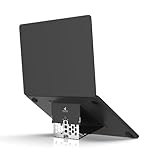
Majextand
💰 ¥7,700
This model pushes portability to the extreme, with a folded thickness of just a few millimeters and a weight of around 150g. It uses an adhesive mounting method that attaches directly to the underside of your laptop, letting you deploy it even while it's still in its case. Made from aircraft-grade aluminum, it maintains solid rigidity despite its thin profile.
Pros
- Extremely thin when folded, taking up almost no space in your bag
- The adhesive design makes it easy to use even with the laptop still in its case
- Lightweight, so it's not a burden to carry around for long periods
Cons
- Height adjustment range isn't as wide as stationary models
- How the adhesive holds up over long-term use may vary by unit
Best for
People who work on the go frequently and want to keep their load as light as possible. 🛒 Check the price →
BoYata Laptop Stand with Height and Angle Adjustment
This aluminum alloy stand's standout feature is continuous height and angle adjustment. Since you can fine-tune it in 1cm increments to match your seated height and desk, it's ideal if you want to dial in your exact eye-level position. It also supports a wide range of laptop sizes, making it convenient for households that switch between multiple laptops.
Pros
- Continuous adjustment lets you fine-tune it precisely to your build and desk setup
- Aluminum alloy construction offers high rigidity and excellent heat dissipation
- Supports a wide range of screen sizes
Cons
- Retains some thickness and weight even when folded, so portability is modest
- With more moving parts, it may feel a bit stiff right out of the box
Best for
People who want to optimize their working posture over long sessions at a fixed desk at home or in the office.🛒 Check the price →
Anker PowerExpand+ 7-in-1 Stand
This model combines a stand with a USB-C hub. It includes USB-A ports, HDMI output, an SD card slot, and PD charging pass-through, letting you tidy up your desk cabling just by setting up the stand. With more ports comes a slightly larger footprint and weight compared to a simple stand.
Pros
- No need to buy a separate stand and expansion hub
- PD charging support lets you power your laptop through the hub
- HDMI output lets you connect an external display directly
Cons
- Overkill and not great value if you don't need the hub functionality
- Larger and heavier than single-function stands
Best for
People who want to organize desk cabling and frequently connect an external monitor or peripherals.🛒 Check the price →
MOFT Folding Laptop Stand
This stand is designed around a thin, lightweight profile. It folds down to just a few millimeters, fitting easily into the inner pocket of a laptop case. It supports multi-stage angle adjustment, making it a well-balanced model that combines portability with a basic level of adjustability.
Pros
- Remarkably thin when folded, so it's easy to carry
- Multi-stage adjustment lets you pick an angle that suits your working posture
- Available in multiple colors, so you can factor in design as well
Cons
- Being resin-based, it doesn't offer the rigidity or heat dissipation of aluminum stationary models
- Weight capacity may be set lower than stationary models
Best for
People who prioritize portability but still want at least basic angle adjustment.🛒 Check the price →
Elecom 4-Stage Laptop Stand
A simply designed stand from a domestic manufacturer. It supports 4-stage height adjustment, letting you lock it in place to suit your usage. While it doesn't offer the fine control of continuous adjustment, its simple structure makes it easy to use, and it's priced at an entry-level range.
Pros
- 4-stage adjustment provides basic height customization
- Simple structure that's durable and easy to understand
- Made by a domestic manufacturer, so specs and support information are easy to check
Cons
- Harder to dial in the exact right height compared to continuous adjustment
- Mostly resin construction, so heat dissipation isn't as strong as aluminum
Best for
First-time laptop stand buyers or anyone who's fine with simple functionality.🛒 Check the price →

Rain Design mStand
💰 ¥8,338
A stationary stand featuring a unibody aluminum construction. The angle is fixed, but this design prioritizes stability and heat dissipation. Built with the assumption that it will stay permanently on your desk, it's better suited to those who value a polished, complete work setup over portability.
Pros
- Unibody aluminum construction offers exceptional rigidity and stability
- Even with a fixed angle, it helps maintain a stable line of sight and posture while typing
- Elegant design that fits naturally into a desk setup
Cons
- No angle or height adjustment, so you can't fine-tune it to your build or preference
- Not designed for portability, so it's not suited for carrying around
Best for
People who want to set it up permanently at a home or office desk for a stable work environment. 🛒 Check the price →
Sanwa Supply Laptop Stand for Neck Strain Relief
This multi-stage adjustable stand is designed specifically to address neck and shoulder strain. Made of aluminum alloy for solid heat dissipation, its multiple angle settings make it easy to bring the screen closer to eye level. As you'd expect from a domestic office equipment brand, its clear labeling of compatible sizes and weight capacity also makes it easy to shop for.
Pros
- Multi-stage adjustment makes it easy to bring the screen closer to eye level
- Aluminum alloy construction ensures solid heat dissipation
- Clear labeling of compatible sizes and weight capacity
Cons
- Doesn't offer the fine-tuned height control of continuous adjustment
- Its stationary-leaning design makes it less ideal for frequent transport
Best for
People doing long desk-work sessions who want to reduce neck and shoulder strain.
How to Choose by Use Case
- Mainly working from cafes or on the go: Prioritize thin folded profile and light weight — consider the Majextand or the MOFT Laptop Stand.
- Fixed setup at home or the office: Prioritize adjustment range and stability — the BoYata Laptop Stand or Rain Design mStand are good candidates.
- Want to tidy up your desk cabling too: Rather than a standalone stand, choose a hub-integrated model like the Anker PowerExpand+ 7-in-1 Stand to keep cables organized.
- Just want to try one at an affordable price: Starting with a simple multi-stage model like the Elecom Laptop Stand is a reasonable choice.
- Mainly want to relieve neck and shoulder strain: Choose a multi-stage or continuous adjustment type that brings the screen closer to eye level (such as the Sanwa Supply Laptop Stand or BoYata Laptop Stand).
FAQ
Q. Does using a laptop stand make the keyboard harder to type on?
Since raising the laptop also raises the position of the built-in keyboard and trackpad, using an external keyboard and mouse becomes essential. If you plan to use the laptop's built-in keyboard for long periods with just the stand, keep the height setting modest to avoid an unnatural wrist angle, or use a wrist rest to reduce strain.
Q. Is it okay to put a laptop that's outside the compatible size range on a stand?
Using a laptop outside the compatible size range can cause it to overhang the platform, reducing stability, or exceed the weight capacity, which can lead to flexing or damage. Before buying, check your laptop's screen size and weight, and choose a product that falls within its supported range.
Q. Is there a difference in heat dissipation between aluminum and plastic models?
Aluminum has higher thermal conductivity than plastic, so it tends to dissipate heat more effectively through the stand's platform and legs. That said, the actual heat dissipation effect also depends on the stand's structure — such as the contact area with the laptop and how airflow is maintained — so it's worth checking the leg design in addition to the material.
Q. Which should I buy first: a folding stand or a stationary one?
If your work style isn't fixed yet, a folding stand is the more adaptable choice since it can handle changes in how you work. If you're fairly certain you'll be using it at home or in the office, a stationary stand — which can prioritize adjustment range and stability — tends to offer higher long-term satisfaction.
Q. How do I maintain a laptop stand?
For most products, simply wiping the aluminum or plastic surface with a dry or slightly damp cloth is enough. Dust can accumulate in moving parts (hinges) and make adjustments feel stiff, so periodically cleaning them with a dry cloth or soft brush helps keep the movement smooth.
Conclusion
The first things to check when choosing a laptop stand are these four points: adjustment method (continuous, multi-stage, or fixed), portability (folded thickness and weight), material (aluminum or resin), and compatible size and weight capacity.
- If portability is your top priority: the Majextand or MOFT Laptop Stand
- If you want adjustment range and stability for a fixed home setup: the BoYata Laptop Stand or Rain Design mStand
- If you also want to organize your cabling: the Anker PowerExpand+ 7-in-1 Stand
- If you want an affordable option with simple functionality: the Elecom Laptop Stand
- If your main goal is relieving neck and shoulder strain: the Sanwa Supply Laptop Stand
Narrow down your candidates from the categories above based on your own work style — how often you travel, your desk environment, and your laptop's size.




![[2026 Latest] Fountain Pen Comparison Guide [2026 Edition]](/images/eyecatch/articles/fountain-pen-comparison-2026.png)
![[2026 Latest] Best Ballpoint Pens Compared: The Ultimate Ranking](/images/eyecatch/articles/ballpoint-pen-ranking-comparison.png)